Shopping centres
Discover shops and services, explore offers, find lost property and plan a route through the centre.
Explore the shopping experienceA smart guide to physical spaces
A clearer way to find, explore and do more.
Navigation, shopping and services. Connected to your space.
Made for the mobile browser / No app download in the proposed journey
 Explore your surroundingsLevel 01


A lot more exploring.
 CAFÉ
Find your next coffee spot.
Illustrative map · No live venue data
FIND. DECIDE. DO.
Teseu is being designed to bring the convenience of a maps app inside large venues, connecting people with destinations, products and useful services.
The experience would adapt to each place: discover a shop, find and buy groceries, or plan your way through an airport. Each deployment needs its own map, operating rules and integrations.
01 / A simple way in
The proposed visitor journey starts in the mobile browser. No app download: a QR code at the venue opens its own tailored guide.
Open the guide from a sign or kiosk. The venue’s information and services would be brought together in one mobile experience.
Search for a place, product or service. Choose your destination and confirm your starting point for a map-based route.
Explore offers, build a shopping basket or plan a food collection, depending on the services agreed and integrated for that location.
Proposed access journey. This presentation and its sample interactions are not a live venue service.
02 / Explore the navigation concept
Try an illustrative journey. This interactive concept shows how discovery and wayfinding can work together.
Select a destination to explore a different journey.
A searchable directory and a clear route can help visitors spend less time looking for a place to pause.
Sample interaction only. No live map, inventory or location data is connected.
03 / Three experiences. One vision.
Navigation is the starting point. The proposed services go further, with a different journey for each environment.
Discover shops and services, explore offers, find lost property and plan a route through the centre.
Explore the shopping experienceFind products, scan items into a basket and explore a purchase journey where your own phone becomes your checkout.
Explore the shopping journeyFind your gate, follow flight updates and explore food ordering and collection as part of a connected terminal experience.
Explore the airport experienceA product vision, developed with each venue. The capabilities below describe proposed experiences. Availability depends on the agreed scope, development, authorised data, partnerships and real-world validation.
Shopping centres / Proposed experience
From a specific shop to a place to pause, the aim is to make the centre easier to explore and its services easier to use.
Visitors could search by shop name or describe what they need: “I want a chocolate cake” or “Where can I find a clothing shop?” An AI assistant would suggest relevant places based on information supplied and maintained by the centre and its retailers.
The directory could also include toilets, lifts, stairs, food courts and other registered services. Response quality would depend on the accuracy and coverage of the available information.
After choosing a destination, visitors would enter or confirm their starting point. An interactive map would show a route through the centre’s corridors, based on approved floor plans and validated connections.
Camera-based directions are also part of the vision, with separate development and on-site positioning tests required.
The centre could register found items with descriptions and, where appropriate, photos. Visitors could browse the list and follow the centre’s process to confirm ownership and collect an item.
Retailers could promote products, offers and promotions within the guide. Clearly labelled advertising could create a commercial opportunity, with pricing and any revenue share for the centre agreed through negotiation.
A future extension could help visitors identify shops offering a particular product. Reliable availability would require retailer system integrations or another agreed process for keeping product information current.
Supermarkets & wholesale stores / Proposed experience
A proposed combination of indoor product discovery and mobile self-checkout. The aim is to let customers register and pay for purchases using their own phones.
A QR code on a sign or kiosk would open the guide in the customer’s browser. The proposed options are identification through the retailer’s loyalty programme, using a CPF in Brazil and the authentication process defined by the retailer, or a guest purchase session with a temporary code.
Benefits such as cashback would depend on an integration with an existing retailer programme. Identification, session handling and use of customer data would be agreed with the retailer.
Customers could search a connected catalogue, consult prices and offers, and find a route to the aisle and location assigned to a product. Camera-based guidance is a further development goal.
Catalogue data, prices, stock and shelf locations would need to be supplied, integrated and kept up to date by the store.
Customers would scan existing product barcodes as they pick up items. The virtual basket would list registered products and show the purchase total before checkout. Alternative labelling could also be studied with the retailer.
Customers could continue to a conventional checkout under the store’s agreed process, or complete payment in the site using supported integrations, such as Pix, cards and digital wallets, including Apple Pay where available.
Unlike a shared self-service kiosk, each customer would use their own phone. The aim is to avoid the conventional checkout queue when paying online, while following the store’s verification process.
The proposed exit flow would compare the paid purchase with tagged items detected by sensors. A discrepancy could alert staff to carry out a check.
This capability still needs feasibility studies and real-world validation. Tag and sensor technology, reliability, costs and discrepancy procedures would be assessed with the retailer. Scanning a barcode into a basket does not, by itself, enable automatic remote detection of every item at the exit.
Airports / Proposed experience
A connected terminal journey: find a service, follow flight information, collect a meal and make your way towards the gate.
Passengers would scan a QR code and search the terminal map for check-in desks, boarding gates, baggage reclaim, toilets, shops, restaurants and other services.
Routes would need to reflect real floors, access restrictions, checkpoints and the areas each passenger may enter. Camera-based guidance would require additional development and validation.
Passengers could select or enter a flight to see its scheduled time, status and boarding gate, using an authorised, integrated data source. They could then select the gate as a destination.
Gate and time changes would be shown according to the source’s coverage and update capabilities; live flight information is not connected in the current demonstration.
Passengers could explore participating restaurants, choose a meal and order through Teseu, then follow the collection instructions and pick it up at the restaurant counter.
This would require agreements with each restaurant operator and integration with available ordering and payment services. No restaurant partnerships or API access are assumed.
A further possibility is flight search and ticket purchases through authorised airlines or travel partners. Flight selection, payment, ticket issuance and support would need to be scoped with those partners.
Counter collection refers to food orders. Ticket issuance and presentation would follow the airline’s or travel partner’s process.
04 / Beyond the map
The vision includes augmented-reality navigation: directions overlaid on the live camera view, guiding a visitor towards a selected destination.
For this to work, Teseu would need to determine the visitor’s position and orientation accurately. Camera localisation and guidance still need to be developed and tested in real venues.
Future capability · Not a working camera demoAccuracy, device support and on-site behaviour require validation.
05 / What you can explore today
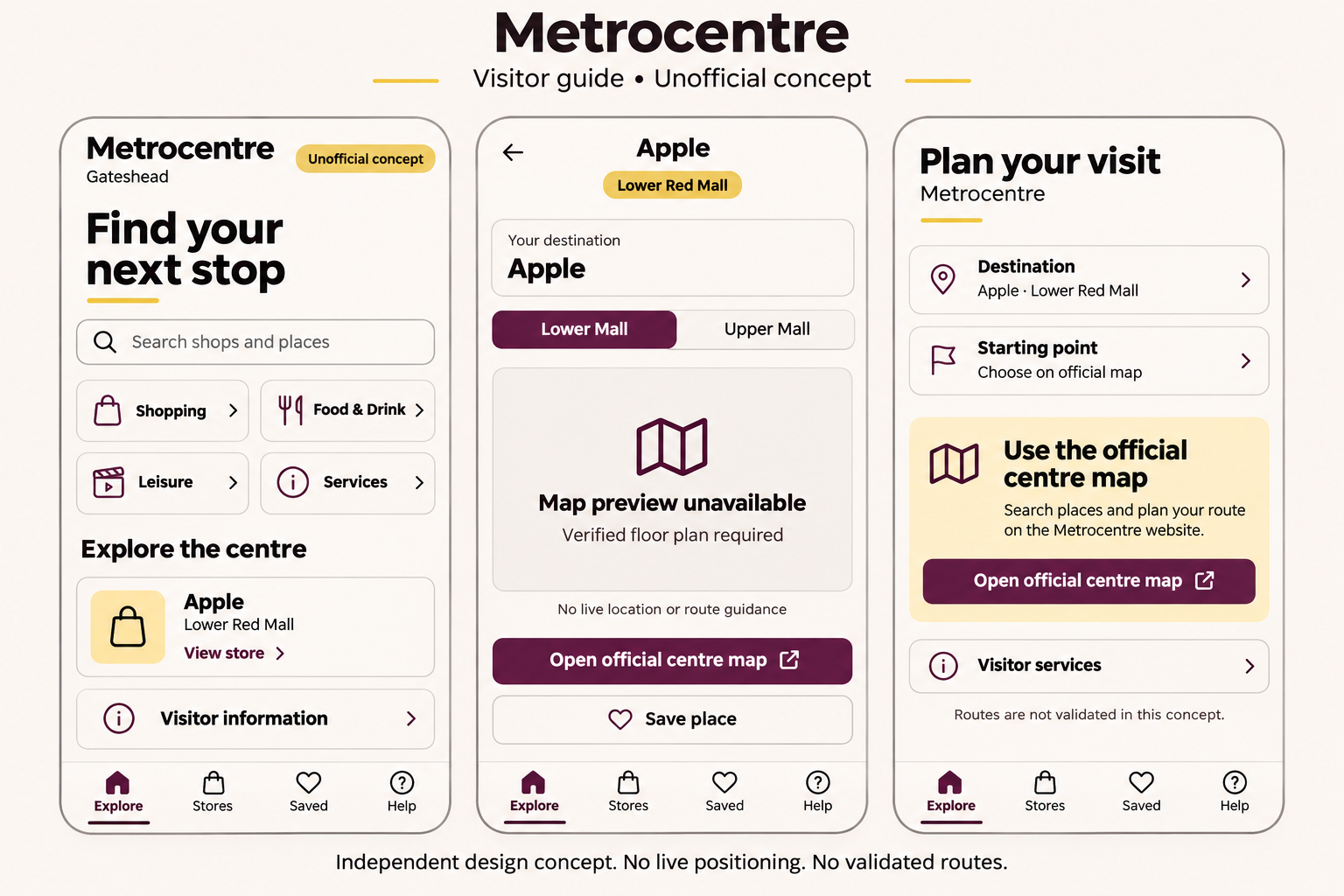
Explore a limited, independent visitor-guide demonstration. It illustrates part of the vision, rather than the full set of proposed capabilities.
 Explore the demo ↗
GATESHEAD, UNITED KINGDOM
A mobile-first visitor guide concept for Metrocentre. Explore a four-place sample, search destinations and save places for later.
06 / From vision to venue
Start with a focused demonstration. Build the real experience around verified information and a clearly agreed scope.
Start a conversation ↗We discuss your visitors, operational priorities, floor plans, access rules and existing systems.
A demonstration brings the idea to life. Where verified plans are unavailable, illustrative content is clearly identified.
Agree on the features, data sources, partners, payments and commercial terms. The venue and its partners supply the approved information and access needed for implementation.
Validate routes, content and integrated services in the real venue before launch. Camera positioning and automated exit checks require their own feasibility and reliability testing.
A few useful answers
No customer deployments are claimed on this page. The examples shown are illustrative concepts, not partnerships or endorsements.
A production route needs approved floor plans, mapped connections and on-site validation. The starting point may be entered or confirmed by the visitor. Automatic camera localisation is a separate development goal.
The homepage offers a schematic route interaction. The Metrocentre demo has a four-place sample, search, saved places and links to official information. Camera navigation, payments, automated exit checks, flight updates and restaurant ordering are proposed capabilities, not live services in these demos.
Yes. We welcome international project conversations. Scope, delivery, pricing, payment currency and supported payment methods are agreed individually.
Let’s find your direction
Tell us about your venue, your visitors and the journey you want to improve.

